Voice dictation into the terminal
Speak a command and TermHub types it onto the shell line, transcribed entirely on your phone, with the audio never leaving the device. Two engines cover everyday use and higher accuracy, and an optional cleanup pass trims the ums and uhs.
Two engines
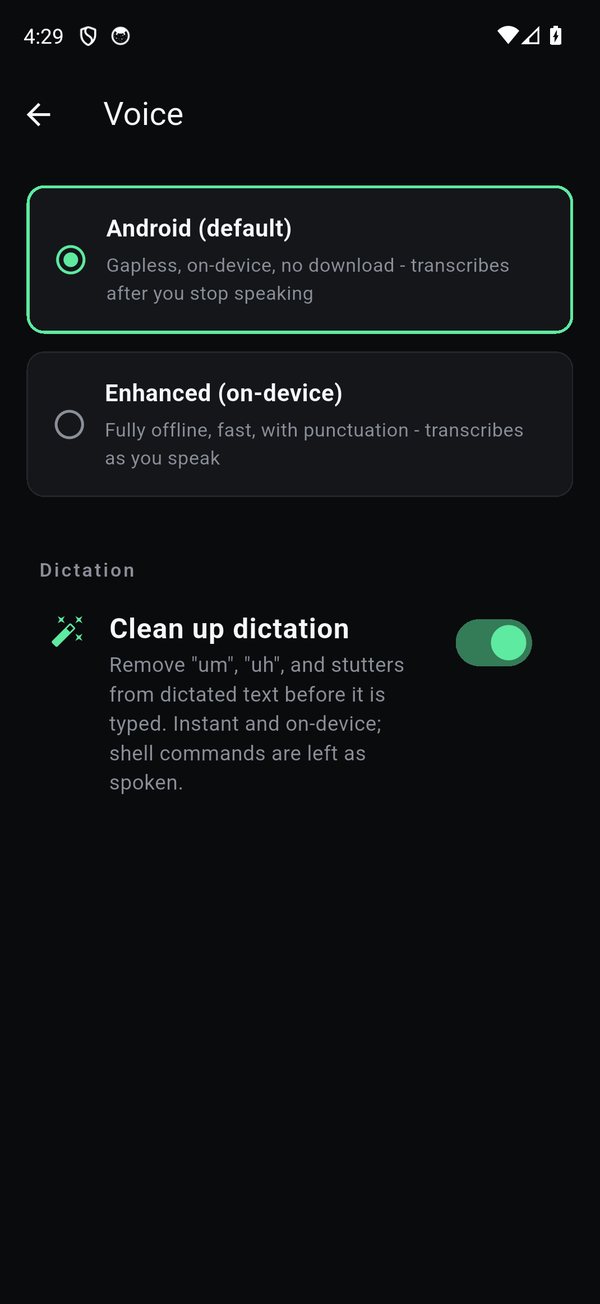
Android (default) works out of the box with no download, it records the whole clip and transcribes after you stop speaking. Enhanced (on-device) is a downloadable engine that's fully offline, faster, and adds punctuation and casing, transcribing as you speak. Pick either under Settings › Voice; both run entirely on the phone.
How to dictate
Open the Command Dial and tap the microphone. Speak, then choose what happens: Confirm types the text onto the shell line unexecuted so you can review it, and Send types it and presses Enter. Tap cancel to discard.
Clean up dictation
With cleanup on, TermHub removes filled pauses ("um", "uh") and stutters before the text is typed, instantly and on-device. It's careful with commands: a shell command like git status is left exactly as spoken, never "corrected".
Good to know
- On-device and private, audio never leaves your phone, on either engine.
- Enhanced needs a one-time download and a bit more memory; the Android engine stays available and is a better fit for low-fidelity audio.
Get TermHub
TermHub is live on Google Play. Install it and connect to your first host in a couple of minutes.