Reach any server with Tailscale
Reach your Mac or server from your Android phone over a private tailnet, no port forwarding and nothing exposed to the public internet. Keeping a session usable from a phone, with a LAN shortcut at home and a private path everywhere else, is the part most tutorials skip.
What is Tailscale, and why pair it with TermHub?
Tailscale is a private network that connects your own devices directly to each other, wherever they are. It is built on WireGuard, a modern encrypted protocol, so traffic between your phone and your host is end-to-end encrypted, and the devices reach each other by a stable private name instead of a public address. Tailscale's coordination service helps your devices find each other but never sits in the middle of your traffic or decrypts it, and it is free for personal use.
That is exactly what a phone terminal needs. You never open a port on your router or expose SSH to the public internet. You give TermHub the Tailscale name of your host, and it connects over that encrypted network from anywhere, then uses a fast local address when you are home (see the fallback step below).
What this guide assumes
- You administer the Mac or Linux host you're connecting to
- Tailscale is an acceptable private path for you
- You want a reusable phone client, not a one-off
Put both devices on the same tailnet
Install Tailscale on the host from tailscale.com/download (Mac, Linux, or Windows), and the Tailscale app on your phone from Google Play. Sign both into the same account and they join the same tailnet, where the host gets a stable name like
your-mac.tailnet-name.ts.netthat you type once into a saved host.Tailscale SSH or ordinary sshd
Both work. Tailscale SSH can accept a connection with no stored password, pick Automatic auth in TermHub and it will offer keyless and configured keys before any password prompt. Ordinary sshd over the tailnet IP uses your normal keys or password, just on a private address.
Keep the host awake
A phone terminal can't wake a sleeping Mac. Set Energy Saver /
pmsetso the host stays reachable, especially if something should keep working overnight. (The host check flags the common miss.)Save the host in TermHub
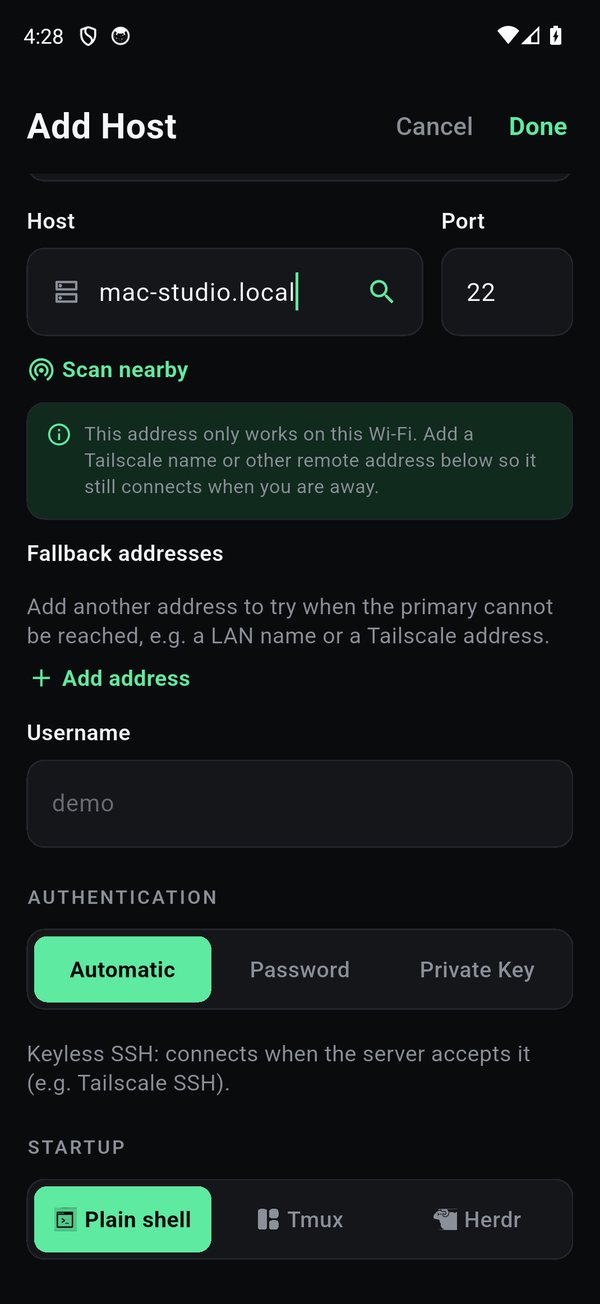
Use the MagicDNS name or tailnet IP as the address and set authentication to Automatic. That's all a keyless Tailscale SSH host needs.
# what you type once into a saved host
Host        mac-mini.tailnet-name.ts.net
User        you
Auth        Automatic
Startup     attach tmux/herdr session "work"
Add a LAN shortcut as the fallback
Set your fast LAN address as the primary and the Tailscale name as the fallback. At home you connect over the local network; everywhere else TermHub falls through to the tailnet. It only ever falls through when an address is unreachable, never because of a key or auth problem, and it flags a LAN-only primary so you know to add the remote one.
Reconnect and reattach
Point the host's startup at a Herdr or tmux session so every reconnect reattaches instead of starting fresh. When the phone sleeps or the network changes, the work on the host keeps going and you rejoin it losslessly.
Good to know
- One fallback address per host, primary tried first, the fallback only on an unreachable primary. (Not a long ordered list.)
- SSH transport, a network change means reconnect-and-reattach, which is lossless with tmux/herdr. There's no Mosh roaming.
- Trust is per address. A new fallback prompts for its host key the first time, exactly like a new host.
Get TermHub
TermHub is live on Google Play. Install it and connect to your first host in a couple of minutes.